الخميس، 24 أكتوبر 2013

تحميل برنامج فلاش بلاير كامل .... البرنامج لا يحتاج الى انترنت

بسم الله

في بعض الاحيان تتمنى لو كان لديك برنامج الفلاش بلاير على جهازك 
لكي تثبته في اي وقت فمثلا عندما تقوم بتنزيل ويندوز لجهاز ما وبعد التثبيت تقوم كالعادة بتثبيت كافة البرامج الاساسية ومن ضمنها برنامج فلاش بلاير ولكن ليس لديك وقت للتحميل او ليس لديك اتصال بالانترنت لكي تقوم بتحميله
والحل 
هو هذا الملف به برنامج فلاش بلاير كامل ولا يحتاج إلى اتصال بالانترنت اثناء التثبيت

تحميل حزمة اللغة لبرامج اوفيس 2010 download language packs for office

لينكات تحميل مباشرة لحزمة اللغات للتثبيت داخل برامج الاوفيس 2010
لينكات رسمية


  • Click here to download the Arabic Language Pack for 32bit (x86) OS
  • Click here to download the Arabic Language Pack for 64bit (x64) OS

  • Click here to download the Brazilian-Portuguese Language Pack 32bit (x86) edition
  • Click here to download the Brazilian-Portuguese 32bit(x64) edition
  • Click here to download the Bulgarian Language Pack for 32bit (x86) OS
  • Click here to download the Bulgarian Language Pack for 64bit (x64) OS
  • Click here to download the Croatian Language Pack for 32bit (x86) OS
  • Click here to download the Croatian Language Pack for 64bit (x64) OS
  • Click here to download the Czech Language Pack for 32bit (x86) OS
  • Click here to download the Czech Language Pack for 64bit (x64) OS
  • Click here to download the English Language Pack for 32bit (x86) OS
  • Click here to download the English Language Pack for 64bit (x64) OS
  • Click here to download the Estonian Language Pack for 32bit (x86) OS
  • Click here to download the Estonian Language Pack for 64bit (x64) OS
  • Click here to download the Greek Language Pack for 32bit (x86) OS
  • Click here to download the Greek Language Pack for 64bit (x64) OS
  • Click here to download the Hungarian Language Pack for 32bit (x86) OS
  • Click here to download the Hungarian Language Pack for 64bit (x64) OS
  • Click here to download the Kazakh Language Pack for 32bit (x86) OS
  • Click here to download the Kazakh Language Pack for 64bit (x64) OS
  • Click here to download the Latvian Language Pack for 32bit (x86) OS
  • Click here to download the Latvian Language Pack for 64bit (x64) OS
  • Click here to download the Lithuanian Language Pack for 32bit (x86) OS
  • Click here to download the Lithuanian Language Pack for 64bit  (x64) OS
  • Click here to download the Romanian Language Pack for 32bit (x86) OS
  • Click here to download the Romanian Language Pack for 64bit (x64) OS
  • Click here to download the Serbian Language Pack for 32bit (x86) OS
  • Click here to download the Serbian Language Pack for 64bit (x64) OS
  • Click here to download the Slovenian Language Pack for 32bit (x86) OS
  • Click here to download the Slovenian Language Pack for 64bit (x64) OS
  • Click here to download the Slovak Language Pack for 32bit (x32) OS
  • Click here to download the Slovak Language Pack for 64bit (x64) OS
  • Click here to download the Turkish Language Pack for 32bit (x32) OS
  • Click here to download the Turkish Language Pack for 64bit (x64) OS
  • Click here to download the Ukrainian Language Pack for 32bit (x86) OS
  • Click here to download the Ukrainian Language Pack for 64bit (x64) OS
  • Click here to download the Simplified Chinese Language Pack for 32bit (x86) OS
  • Click here to download the Simplified Chinese Language Pack for 64bit (x64) OS
  • Click here to download the Traditional Chinese Language Pack for 32bit (x86) OS
  • Click here to download the Traditional Chinese Language Pack for 64bit (x64) OS
  • Click here to download the Danish Language Pack for 32bit (x86) OS
  • Click here to download the Danish Language Pack for 64bit (x64) OS


  • Click here to download the Dutch Language Pack for 32bit (x86) OS
  • Click here to download the Dutch Language Pack for 64bit (x64) OS
  • Click here to download the Finnish Language Pack for 32bit (x86) OS
  • Click here to download the Finnish Language Pack for 64bit (x64) edition
  • Click here to download the French Language Pack for 32bit (x86) edition
  • Click here to download the French Language Pack for 64bit (x64) edition
  • Click here to download the German Language Pack for 32bit (x86) edition
  • Click here to download the German Language Pack for 64bit (x64) edition
  • Click here to download the Hebrew Language Pack for 32bit (x86) edition
  • Click here to download the Hebrew Language Pack for 64bit (x64) edition
  • Click here to download the Hindi Language Pack for 32bit (x86) edition
  • Click here to download the Hindi Language Pack for 64bit (x64) edition
  • Click here to download the Italian Language Pack for 32bit (x86) edition
  • Click here to download the Italian Language Pack for 64bit (x64) edition
  • Click here to download the Japanese Language Pack for 32bit (x86) edition
  • Click here to download the Japanese Language Pack for 64bit (x64) edition
  • Click here to download the Korean Language Pack for 32bit (x86) edition
  • Click here to download the Korean Language Pack for 64bit (x64) edition
  • Click here to download the Norwegian Language Pack for 32bit (x86) edition
  • Click here to download the Norwegian Language Pack for 64bit (x64) edition
  • Click here to download the Polish Language Pack for 32bit (x86) edition
  • Click here to download the Polish Language Pack for 64bit (x64) edition
  • Click here to download the Portugal Portuguese Language Pack for 32bit (x86) edition
  • Click here to download the Portugal Portuguese Language Pack for 64bit (x64) edition
  • Click here to download the Russian Language Pack for 32bit (x86) edition
  • Click here to download the Russian Language Pack for 64bit (x64) edition
  • Click here to download the Spanish Language Pack for 32bit (x86) edition
  • Click here to download the Spanish Language Pack for 64bit (x64) edition
  • Click here to download the Swedish Language Pack for 32bit (x86) edition
  • Click here to download the Swedish Language Pack for 64bit (x64) edition
  • Click here to download the Thai Language Pack for 32bit (x86) edition
  • Click here to download the Thai Language Pack for 64bit (x64) edition
  • الثلاثاء، 15 أكتوبر 2013

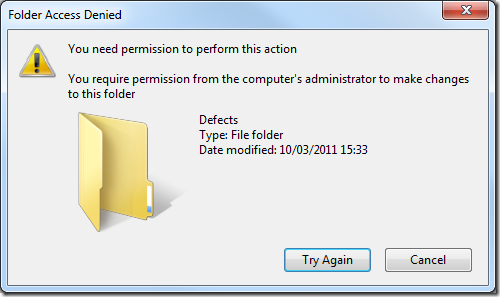
    حل مشكلة you need permission to perform this action

    بسم الله
    حل مشكلة تعطيل التعديل في ملفات داخل مجلد على محرك اقراص C:
    عادة تود تغير في مجلد من المجلدات داخل محرك السي
    ولكن تظهر النافذة التي تخبرك انك لا تمتلك حق الوصول المناسب للتعديل
    بالرغم من انك Administrator

    السبب 
    انه لا يمكن التعديل في هذه المجلدات (حتى للمسئولين Administrators) 
    التعديل متاح لنوع اخر من المستخدمين وهو
    owner
    ولكي يكون المستخدم الخاص بك من المالكين اتبع الخطوات التالية 

    الحل 
    تحذير : هذه الطريقة تمكنك من التعديل في مجلدات النظام غير مستحسن ابدا التعديل في ملفات الويندوز لكي لا يحدث اي مشاكل في الويندوز


    تطبيق صلاحيات المالك للمستخدم الحالى وغيره من المستخدمين
    1- اضغط كليك يمين على المجلد ثم اختر properties
    ثم اضغط على تبويب security
    2- اضغط على advanced


    3- ثم اضغط على تبويب owner
    ثم اضغط على edit

    4-اضغط على replace owner on subcontainers and objects 
    5- اضغط على ok
    ok
    ok
    وإن شاء الله تتحل المشكلة 


    الأحد، 18 أغسطس 2013

    كيفية عمل دوران لملفات صور (ملفات متعددة) باستخدام برنامج Microsoft office picture manager

    بسم الله
     كيفية عمل دوران لملفات صور
    عادة نحتاج ان ننقوم بتدوير ملف صورة ولعمل ذلك نقوم بفتحها ببرنامج
    windows photo viewer


    ثم نقوم بعمل دوران من زرار اسفل الصورة
    ولكن في حالة دوران اكتر من ملف في نفس الوقت .... نحتاج إلى وقت كبير
    ولكن يوجد طريقة لعمل دوران لمجلدات تحوي صور عديدة

    الطريقة
    نفتح برنامج 
    Microsoft office picture manager


    وفي الجانب الايسر نرى اختصارات المجلدات 


    وإذا كان المجلد الذي به الصور المراد دورانها غير موجود بالقائمة
    نقوم بعمل اضافة إلى هذه القائمة كالأتي :


    نضغط على 
    add  picture shortcut


    ومن النافذة نحدد موقع المجلد على جهاز الكمبيوتر


    ثم نختار من قائمة الاختصارات المجلد لتظهر ما بداخله من صور
    نحدد الصور كلها او بعضها


    بعد ذلك نختار من شريط الادوات edit picture
    ثم نختار من اليمين rotate or flip


    نختار نوع الدوران لليمين او لليسار أو درجة الدوران


    ثم بعد ذلك نقوم بحفظ التغيرات
    file - save all


    الاثنين، 13 أغسطس 2012

    تغير لغة الكتابة في شاشة الترحيب (ادخال كلمة السر) change language welcome screen


    وصف المشكلة
    عند ادخال كلمة السر في نافذة الترحيب تكون ملزما دائما بالضغط على مفتاحي تغير اللغة الكتابة من العربي إلى الانجليزي أو العكس وذلك 
    سبب المشكلة
    انه عند تغير لغة الكتابة الافتراضية من لوحة التحكم فإن التغير لا يحدث لشاشة الترحيب ولا لغة الكتابة الافتراضية للمستخدم الذي سيتم انشاؤه


    حل المشكلة 


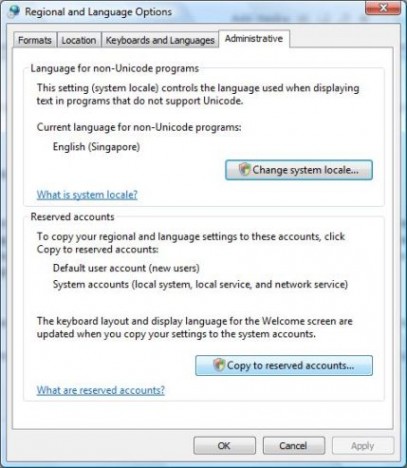
    control panel اولا قم بالدخول على لوحة التحكم


    regional and language options قم باختيار اعدادت اللغة


    Administrative سوف تظهر نافذة اختر منها تبويب باسم

    copy settings  اضغط على


     Welcome screen and system accounts ضع علامة × امام الاختيار الاول

    Ok واخيرا اضغط على
    وقم بعمل اعادة تشغيل لكي يتم تطبيق التغيرات

    السبت، 23 يونيو 2012

    برنامج Winrar 4.2 مع اشكال جديدة له themes

     التحميل
    تحميل النسخة العربي 32 بيت
    تحميل النسخة العربي 64 بيت

    تحميل النسخة الانجليزي 32 بيت
    تحميل النسخة الانجليزي 64 بيت


     themes
    السمات او الاشكال
    طريقة التثبيت
    بعد التحميل اضغط على الملف المضغوط( الذي تم تحميله) وسيفتح ببرنامج winrar وسيسالك إذا كانت ترغب في اضافة هذه السمة إلى لابرنامج
    بعد ذلك افتح برنامج winrar ثم قم بفتح قائمة خيارات ثم سمة

    WinRAR aRRis theme by dReamxis


    WinRAR Imagination 3 theme by dReamxis


    WinRAR Imagination V.II theme by dReamxis


    Reality of WinRAR theme by Pandastudio


    OrgRar theme by Pandastudio


    WinRAR Pentamino 5 theme by Alexey Klimov


    WinRAR Money theme by M.A.G.


    Windows 7 WinRAR theme by Breaz Mihai Florin


    Windows 7 v2 WinRAR theme by Breaz Mihai Florin


    WinRAR Cartoon theme version 1.0 © by pkuwyc


    WinRAR RefreshCL theme version 1.0 © by pkuwyc, based on TPDK art


    WinRAR AquaWorld theme made by AmEagle


    WinRAR Medieval theme made by AmEagle


    WinRAR Alpha Dista theme made by AmEagle and DanielFlaco, based on AlphaDista icon set by DanielFlaco


    WinRAR Crystal Clear theme version 1.00 made by Martin Tomaszczyk, based on Everaldo Coelho art


    WinRAR Tango theme version 1.3 by Nanaki, original icons by Tango Desktop Project


    WinRAR Azeri-Yazi theme version 1.70 by www.bahram.tk


    WinRAR JOM 2 theme version 1.00 © by Jovan Radojevic 2005


    WinRAR FatCow theme version 1.00 by FatCow Web Hosting
    Download:
      version with 32x32 toolbar icons


    المصادر 
    http://www.rarlab.com/download.htm
    http://www.rarlab.com/themes.htm

    الجمعة، 1 يونيو 2012


    VTC Oracle 9i Administration Fundamentals I (1Z0-031)
    Welcome
    Welcome
    Prerequisites for this Course
    About this Course
    Technet Database Administration
    Manuals
    Database Administration
    Oracle Database Administration? pt. 1
    Oracle Database Administration? pt. 2
    The Basic Architecture of Oracle
    Oracle Database Administration Tools
    What are the Tools?
    SQL*Plus
    SQL*Plus Worksheet
    iSQL*Plus
    All the Other Oracle Tools
    Database Configuration Assistant pt. 1
    Database Configuration Assistant pt. 2
    Oracle Enterprise Manager Console pt. 1
    Oracle Enterprise Manager Console pt. 2
    The Management Server and the Agent
    Net Configuration Assistant and Net Manager
    Oracle Enterprise Manager Console pt. 3
    Oracle Enterprise Manager Console pt. 4
    The Architecture of Oracle
    Oracle Database Architecture
    Memory Structures
    Processes
    Datafiles/Tablespaces/Objects
    Control Files/Logging/Archiving/Recovery
    COMMIT vs ROLLBACK
    Rollback and Undo
    Temporary Sort Space
    How it all Fits Together
    Oracle Managed Files
    Partitioning
    Installing Oracle and Creating a Database
    The Oracle Installer pt. 1
    The Oracle Installer pt. 2
    The Oracle Installer pt. 3
    Configuration Parameter Files pt. 1
    Configuration Parameter Files pt. 2
    SQL*Net Configuration Files
    Oracle Optimal Flexible Architecture
    Windows Specifics pt. 1
    Windows Specifics pt. 2
    Creating a Database with a Script pt. 1
    Creating a Database with a Script pt. 2
    Starting Up and Shutting Down a Database
    Connecting to a Database
    STARTUP Command pt. 1
    STARTUP Command pt. 2
    SHUTDOWN Command pt. 1
    SHUTDOWN Command pt. 2
    Combining STARTUP and ALTER DATABASE
    The Oracle Enterprise Manager Console
    Configuration Parameters
    What is the Parameter File?
    Looking at Parameters
    The Parameters and What They Do pt. 1
    The Parameters and What They Do pt. 2
    The Parameters and What They Do pt. 3
    DDL and the Physical Database
    DDL and the Physical Database?
    The ALTER DATABASE Command
    Looking at the Database
    Changing Datafiles
    Sizing of Datafiles
    Datafiles and Tempfiles
    Control Files
    Logfiles and Archives pt. 1
    Logfiles and Archives pt. 2
    The ALTER SYSTEM Command pt. 1
    The ALTER SYSTEM Command pt. 2
    Automated Undo/Manual Rollback pt. 1
    Automated Undo/Manual Rollback pt. 2
    Metadata Views
    DDL and the Logical Database
    What is the Logical Database?
    Tablespace Management pt. 1
    Tablespace Management pt. 2
    Tablespace Management pt. 3
    Metadata Views
    Expanding Database Objects
    Tables pt. 1
    Tables pt. 2
    Tables pt. 3
    Indexes pt. 1
    Indexes pt. 2
    Clusters
    Index Organized Tables
    Sequences
    UNDROP, PURGE and the Recycle Bin
    Partitioning
    Metadata Views pt. 1
    Metadata Views pt. 2
    Expanding Security for Database Administration
    Types of Users
    Grants and Revokes
    Create and Alter User Syntax
    Administration
    Users
    Database Auditing
    Scheduling
    The DBMS_JOB Package
    Job Scheduling in Oracle
    Scheduling/Executing Jobs in Windows and Unix
    Utilities
    Expor
    Import
    SQL*Loader
    ORAPWD and ORADIM
    Built-In Packages
    Supplied
    Packages
    Scripting for Automation

    Some Example Scripts

    Oracle Database Administration Fundamentals II (1Z0-031)
    Welcome
    Prerequisites for this Course
    About this Course
    Oracle Net Services on Technet
    Oracle Backup and Recovery on Technet
    Other Applicable Technet Options
    Introducing Oracle Net Services
    What is Oracle Net Services?
    Three Basic Configurations
    Managing Oracle Database Networks
    Local Versus Centralized Naming
    Simple Server Configuration
    Oracle Shared Servers or MTS pt. 1
    Oracle Shared Servers or MTS pt. 2
    Simple Client Configuration
    Connection Profiles
    Introducing Naming Options pt. 1
    Introducing Naming Options pt. 2
    Oracle Connection Manager
    Net Configuration Assistant
    Net Manager
    Using Oracle Enterprise Manager
    Introducing Backup/Recovery Options/Utilities
    Different Backup and Recovery Options
    Import and Export
    Cold Backups (Offline)
    Hot Tablespace Backups (Online)
    RMAN or Recovery Manager
    Recovery
    Standby Databases
    Physical Standby Databases
    Logical Standby Databases
    Replication
    Replication by Other Means
    What are Transportable Tablespaces?
    What is SQL*Loader?
    Oracle Net Services Architecture
    Net Services Architecture
    The Open Systems Interconnection (OSI) Model
    Oracle OSI Model
    Protocols
    Net Services Communication
    Dedicated and Shared Connections
    Shared Server Processes and Dispatchers
    Configuring a Simple Connection
    Listener Configuration File
    The TNS Names Configuration File
    The Profile Parameters File
    Basic Database Configuration Parameters pt. 1
    Basic Database Configuration Parameters pt. 2
    Using the Net Configuration Assistant pt. 1
    Using the Net Configuration Assistant pt. 2
    The Listener
    What is the Listener? pt. 1
    What is the Listener? pt. 2
    Basic Listener Configuration
    The Listener Control Utility
    Service Registration
    Listener Queue Size
    Switching Off Listener Logging and Tracing
    Timeouts
    Multiple Listeners pt. 1
    Multiple Listeners pt. 2
    Connection Load Balancing and Failover
    The Session Data Unit Buffer (SDU)
    Connection Profile Configuration
    Connection Strings and Naming Methods
    Connection Strings
    Naming Methods
    Local Naming Using TNS
    Host Naming
    External Naming
    Directory Naming pt. 1
    Directory Naming pt. 2
    Oracle Names Server
    Oracle Shared Servers
    Multithreaded Server
    Introducing Dispatchers
    Dispatchers and Connection Pooling
    Other Shared Server Parameters
    Overriding Shared Servers
    Connection Manager
    What is Connection Manager?
    Connection Concentration
    Multiple Protocol Support
    Configuring Connection Manager
    Other Oracle Net Services Utilities
    Other Oracle Net Services Utilities
    Oracle Net Services Advanced Features
    What is TAF?
    TAF Parameters
    Configuring TAF
    Non-Oracle Database Connections
    Oracle Net Services Metadata
    Performance Views
    Backup and Recovery
    What is Backup and Recovery?
    Why Backup and Recovery?
    Things to Remember
    Things to Consider with Datafiles
    Redo Logs
    Controlfiles
    Archive Logs
    More Things to Consider
    Yet More Things to Consider
    Importance of Backup and Recovery
    Points of Failure 1312 Backup Strategy
    How Backup and Recovery Works
    Processes/Memory Structures/Checkpoints
    All the Files
    SCNs
    Restore and Recovery
    Archive Configuration
    Basic Archive Configuration Parameters
    Archive Log Mode Configuration pt. 1
    Archive Log Mode Configuration pt. 2
    Multiple Archiving Processes
    Multiple Archive Destinations
    Standby Archiving pt. 1
    Standby Archiving pt. 2
    Logical Backups Using Exports
    Full Exports and Imports
    Schemas
    Multiple Schemas
    Importing to a Different Schema
    Tables
    The Parameter File
    Export and Import Options
    Physical Backup/Restore/Recovery
    Cold Backups
    Hot Backups
    Verify Backups Using DBVERIFY
    Recovering using Offline Physical Backups
    Recovering using Online Physical Backups
    Read Only Tablespaces
    Incomplete Recovery
    Scripting Hot Backups
    RMAN (Recovery Manager)
    What is RMAN?
    Repository and Catalog
    The Recovery Catalog
    RMAN Architecture
    What is a Channel?
    Allocating and Releasing Channels
    Creating an RMAN Database
    Creating a Repository
    Connecting to RMAN
    Registering Databases with the Repository
    Viewing the Repository
    Backup Sets
    Types of Backups
    Controlfile Backups
    Datafile Backups
    Tablespace Backups
    Archive Log Backups
    Binary Parameter File Backups
    Database Backups
    Incremental Backups
    Restore and Recovery
    Restore and Recovery in Action
    Scripts and RMAN
    Deleting RMAN Backups
    Oracle Enterprise Manager Backup and Recovery
    Configuring Oracle Enterprise Manager
    Communications
    Win2K Log on as Batch Job
    Export
    Import
    Backup and Recovery
    Backup and Recovery Metadata
    Performance Views
    Transportable Tablespaces
    What are Transportable Tablespaces?
    Uses of Transportable Tablespaces
    Limitations
    Tablespace Sets
    Tablespace Set Verification
    Transporting a Tablespace Set
    Plug In
    SQL*Loader
    What is SQL*Loader?
    The Control File and Complexity
    Input Data File
    Input Data File Structures
    How Rows are Loaded
    Multiple Tables and Formats
    Column Delimiters
    NULL Values
    Load Filtering
    Filler Fields
    Data Types
    Conditional Replacement
    Using SQL
    Generating Data Not in Input Files
    Executing SQL*Loader
    Conventional Versus Direct
    The Parameter File
    A Simple Example Load pt. 1
    A Simple Example Load pt. 2
    Oracle Enterprise Manager
    لتحميل اسطوانة VTC Oracle 9i Administration Fundamentals  اضغط الروابط الاتية
    Vtc Oracle Administration.Fundamentals.I&II.part1.rar – 300.0 MB
    Vtc Oracle Administration.Fundamentals.I&II.part2.rar – 21.7 MB


    VTC Oracle 10g
    01 welcome
    Introduction
    Evolution of Orade Database
    Introducing Oracle lOg
    What the Course is About
    02 Overview
    Features of Oracle lOg
    Performance & Scalability
    Availability
    Security
    Grid Computing
    Automatic Storage Management
    Data Warehousing
    Management of Records
    Oracle Application Builde
    Choice of Development Tools
    Different Versions of lOg
    03 Getting Started
    Preinstallation Checks
    Installation
    Post Installation Tasks
    Upgrading an Existing Oracle Database
    Creating a New Administration Account
    Creating a New Database UseAccount Pt.1
    Creating a New Database UseAccount Pt.2
    Loading Data
    04 Creating Database Objects
    Overview
    Tables Creation
    Tables Modification
    Dealing with Constraints Pt.l
    Dealing with Constraints Pt.2
    Removing Tables
    05 Retrieving & Manipulating Data
    Overview
    Basic Query Construction
    Joining Tables
    Report Customization
    Handling Groups of Data
    Data Addition/Modification & Removal
    Saving & Discarding Data
    06 Administering & Monitoring Database
    Managing Database Settings
    Managing Memory
    Oracle Shutdown & Start Up
    Managing Tablespaces
    Freeing Space
    Managing Database Use Accounts
    Schemas/Roles & Privileges
    Altering a Password for a User
    Dropping a User
    Monitoring the Database
    Monitoring Performance Issues
    Viewing Top SQL
    Monitoring Sessions
    Viewing System Statistic
    07 Service Availability in lOg EE
    Transparent Application Failovein RAC
    Recovery from ErroUsing Flashback
    Using Oracle Secure Backup
    Database Backups & Recovery
    Rebuilding Database Objects Online
    08 SecurIty In lOg EE
    Transparent Data Encryption Feature
    Using Secure Application Roles
    Using Oracle Label Security
    Use of Virtual Private Database
    Using Fine Grained Auditing
    09 Data Manageability
    Management of Large Database
    Exploring Cluste Database
    Automatic Memory Management Feature
    Automatically Managing Undo
    Managing ASH Disk Groups
    Using the Segment Adviso
    Resolving Performance Issues Using ADDM
    SQL Tuning & Access Adviso
    Using Oracle Data Pump
    Advanced Scheduling
    Information Lifecycle Management
    Managing Enterprise ManagePolicies
    10 Data Warehousing
    Oracle Warehouse Builde
    Working with flat File Data
    F Designing Relational Target Warehouse
    Designing EU Data Flow Mappings
    Deploying Objects in Target Warehouse
    Inter-Row Calculations
    Filling Gaps in Sparse Data
    High Speed Data Loading
    ETL Infrastructure
    Using Basic Warehousing Functionality
    Using Materialized Views
    11 Application Development
    Using Oracle Application Express
    Adding P1/SQL Functionality
    Creating a .NET Application
    Creating an Apphcaticn Using PHP
    لتحميل اسطوانة VTC Oracle 10g اضغط الروابط الاتية
    VTC_Oracle 10g.rar – 163.5 MB